ENABLE RIGHT CLICK ON SITES THAT THEY DISABLE IT

While streaming out different websites you across the sites where you find the right click disabled on it. And you are unable to perform lots of task like copy the content and also the opening links in tab and lots more things that browser allow you on right mouse click.Generally these websites implement this to either prevent user to copy their content and also due to various security reasons that normal users may not aware about. But sometime you really wish to make the right click enabled to make your work easier. That's is why i am here to guide you, in this article i will be discussing a method that will help you to enable the right click on the websites that had disabled it, Yes its possible and you can easily do this. So have a look on complete guide discussed below to proceed.

#1 Method(Disabling javascript) 
The thing that disables the right mouse click on the browser is the background running java script and if you disable that you can easily access the content that is right click protected.

a)Chrome
In chrome simply go to “Settings -> Content settings (under the Privacy heading)“, there you will find the options to disable JavaScript and manage exceptions. Simply activate it and save changes.


b)Firefox
In Firefox you can use the Add on SettingsSanity that will enable the options that being officially disabled in the firefox and then you can disable the javascript in it.


c)Opera
In opera browser you just need to visit the settings and then simply disable the javascript in it.


#2 Method(Using 'Right to copy' extension)
This is the another way to enable the right click of mouse on the website as this is the third party extension that will disable the script that blocks the right key access and with that you can easily access the right key functionality in the site in browser.


To download- firefox 
To download- chrome 


Posted by Princ€

TURN ANY YOUTUBE VIDEO INTO A 'GIF'

Want to turn something on YouTube into a GIF, but don’t want to futz with downloading third-party apps or digging around for an online converter?

Here’s a handy, easy to remember trick: just add “GIF” to the beginning of the URL. After “www.” and before “youtube.com”

Steps:-
Step 1. First, open a YouTube video that you’d like to turn into a GIF.

Step 2. Then, put “GIF” in front of the “YouTube” part of the URL at the top of your browser and press Enter.


Before
After

Step 3. You’ll be taken to gifs.com and the clip you selected will automatically show up. Here you’ll be able to make a GIF out of the video you picked.

Step 4. You can now choose the start and stop times for your GIF. Once you’re done tweaking, click “Create gif.”


Step 5. Gifs.com will present you with a preview of what your GIF will look like. Ifyou’re satisfied, you can take the new URL and share it as you wish. If you wantto make further adjustments, hit “Go Back.”


Convert youtube video into gif
Share gif


Posted by Princ€

HACK WEBSITE VIA SQL INJECTION IN ANDROID DEVICES

What is Sql Injection?

SQL injection is a code injection technique,used to attack data-driven applications, in which nefarious SQLstatements are inserted into an entry field for execution (e.g. to dump the database contents to the attacker).SQL injection must exploit a security vulnerability in an application's software, for example, when user input is either incorrectly filtered for string literalescape characters embedded in SQL statements or user input is not strongly typed and unexpectedly executed. SQL injection is mostly known as an attack vector for websites but can be used to attack any type of SQL database.

Steps:-

1.At first you need to download All google dorks from below link.

2. Now chose a Drok and put it into Google search engine. check screenshot( i used'product.php?id=')


3.Now chose a site and copy link url.

4.Download & install our sql attack app from below link.

5.Paste the site url ' Target url' which we are get by google serch .

6.Finally....! click on inject and wait for 5-10 mintutes.

note-processing depend on your interconection, website security, & your mobile speed.

After the process is complete you will get the data of the site.


Now you can view ADMIN EMAIL , PASSWORD, USERS NAME & ALL DETAILS.


YOU CAN ALLSO USE THIS METHOD FOR CC HACKING TOO.

NOTE:-THIS TUTORIAL IS FOR EDUCATIONAL PURPOSE.PLEASE DO NOT TRY TO HARM ANYONE.

To download- all google dork list 
To download- Droid sqli 


Posted via Princ€

TRACE THE SENDER'S IP & LOCATION IN GMAIL

Sometime you receive an email address from unknown sources and before responding to that email you must want to know about the person where youreceive email. And here we have a process to find the location of the sender that is not a difficult job. And thiscan be accomplished by email itself. As the feature is given by default itself, Every email comes upwith a sender details in the header itself. And by using that details you can get the location of the sender by reading out the complete guide discussed below.

Steps:-

1.First of all login into Gmail account where you want to trace sender’s location of any email that you had received. Now open the email which you want to trace and now click on down arrow button there.

2.Now you can see the list of options there and select Show Orignal and a new page will get open in new tab.


3.Now in the new tab, you will see the complete details of the email address and there you will see Ip address of the sender host. Here you can also trace the location of time zone if the IP address is not shown to you.


4.Now copy the IP address and search it on  IP Tracer.Now you will see the complete location of the sender and you will get to know about the sender and also that email is safe foryour or not.


Now you can trace any emails that you believe is unknown and can be spam that can wreck your privacy and even your data, so it’s always better to check the details and then respond to that email only.


Posted via Princ€

[EXCLUSIVE] PREMIUM FACEBOOK SOCIAL TOOLKIT

The method is quite simple and straight and you just need is patch thesocial toolkit to use all its premium feature all for free. So follow up the below steps to proceed.

Steps:-

1. First of all remove the extension from your browser if you already had installed this on your Google Chrome.

2. Now download the Facebook Social Toolkit Premium zip file from below.

3. Now extract the folder and drag and drop the fcachklhcihfinmagjnlomehfdhndhep-2.3.1.crx file from the extracted folder to  extensions  page of your google chrome.


4. Now click on Add Extension button there and the extension will get added.


5. Now in your windows PChead to the below addressin the Explorer.

C:\Users\Hp\AppData\Local\Google\Chrome\UserData\Default\Extensions\fcachklhcihfinmagjnlomehfdhndhep\2.3.1_0\content\js\global

Replace HP with your PC name.


6. Now from the extracted zip file folder you have validate.jsp file that you have to move to the above location by replacing with the existed file.


7. Now open the Google chrome and login into your Facebook account and simply click on extension icon there and you will see all the list of tools.


8. Now try to use any of the premium tool and it will ask for your email andserial key, enter any according to your wish and click on unlock.

9. Thats it you are done, with this, now you have allthe premium tools for free to try in Facebook.

Enjoy all for free as the tool is fully activated now.

To download-click here (premium facebook social toolkit)


Posted by Princ€

RECOVER HACKED FACEBOOK ACCOUNT AT EASE

You just not need to any hard work just a simple method to recover your Facebook profile that you might not know till now and with that you will not need to access your saved email and you can add any alternative email. So follow up some simple steps below to proceed.

1. First of all you need to enter the email address or Phone number in the field at top right and you will see screen that will ask you that you had forget the password.

2. Now simply click on the option Forget Password to see all the possible recovery solutions for it.

3. Now you need to enter your username email or phone number to identify your account.


4. Now you need to click on the option no longer access to these and you will move to next page.


5. There enter any of your new email address to get it registered and then repeat the same on another text field.


6. Now you will move to next page where you need to enter the answers of all the security questions that you had saved while creating your account. And if you enter them wrong them you can’t access your account, so fill them correctly.


7. Thats it you are done, now you have successfully recovered your account and thats too without any need of email address registered there as you will only need a new email there.

NOTE:-THIS TUTORIAL IS FOR EDUCATIONAL PURPOSE ONLY.WE ARE NOT RESPONSIBLE FOR ANY ILLEGAL ACTIVITY.


AUTOLIKES FOR INSTAGRAM [PART 2]

The ultimate app to help you get more likes on Instagram.Join a vibrant community of like-minded users to promote your photos. Each photo you like will bringyou coins. You can in turn spend your coins to put your photos on display for other users of LikeHero tosee. Our community is getting larger by the day and brings you great opportunities to promote your beautiful photos. LikeHero is the simplest app to promote your photos on Instagram. To get more exposure without doing the hard work, you canpurchase the coins (it’s a bargain, really) and with them your way to the stars! No one will ever know howyou manage to get so much Instagram Love in such a short time!

Features:-

*.Like photos to earn coins.

*.Use the coins to get more likesMod Info.

*.This Is Modded version gives you unlimited coins , without using freedom or any other application , just by logging in.

*Bugs fixes.

How to use?
1.Log-in Done.

2.You may have unlimited coins.( Do not update application and do not abuse the LIKE button!)

3.Done !


To download- click here 

Also see- Autolikes for instagram[PART 1] 


Posted by Princ€

FACEBOOK AUTOPLAY VIDEO IRRITATING YOU?HERE IS HOW TO TURN IT OFF

Facebook has recently rolled out an autoplay video feature which enables every video to start playing automatically the moment you see them. The autoplay video feature is present on the mobile app too. The new update might seem irritating for many, Also, users might not be interested in spending their data on each and every video that appears on their homepage. Here is how to disable it.

On the website, go to settings, which is just above the ‘Log Out’ option. On the left column of options, click on video settings at the bottom. Under Video Settings, you can either switch videos between Standard Definition and High Definition, also, you can switch off autoplay videos feature by selecting “Off” instead of default.


On mobile, visit App Settings by clicking on “View your profile” button. In the setting menu, you have the option to switch off the autoplay video feature completely or select between WiFi and mobile data.

NOTE:-Users have the option to choose to activate the feature whenever they want to in future.


Posted by Princ€

SEND MESSAGE TO THE PERSON WHO BLOCKED YOU ON FACEBOOK

I back with new facebook trick which help you to send message who block you on fb,I know you all think it is fake trick but it is 100% working trick
Now back to the topic,you need to follow some steps to do this.

Step:-

1) The first main thing u have to know is the Profile Name/Username of the person who blocked you.

2) For the profile name just open the profile of the person with your any facebook id who Blocked you.

3)Here is the main step, now in the address bar you will find something Like this,

www.facebook.com/username

4) Here the username is the profile name of the person who blocked you....

5)You can even get this profile name in the about info of the person who blocked you...It will be sometime as shown below.

username@facebook.com

6)Now go to your Mail Account...(G mail, Yahoo,Outlook...).

7)Now compose a New Mail.

8)In the To address type the mail id as shown below

username@facebook.com

in my example it is
username@facebook.com

8)Now type the message you want to send in the subject field and click send.

9)That's it your message will be sent to the facebook inbox directly.

Enjoy!!


Posted by Princ€

HACK ANY FACEBOOK GROUP

Today I Tell You How To Hack Any Facebook Group iT iS Very Easy And Simple.Its Depand On You iF You Understand Logic Then iT iS Very Easy For You And You easily Hack Any Group Just in 2 Minutes.

1. First Go To Facebook Group Who You Want To Hack.

2. After Going Click On Group Url And Copy 15 Digits Code.

3. Now Go To Your Profile And Copy Your id number.

4. Now You Have 2 Codes Your id's And Group id's.Put Your Codes into This Url

Example:-
https://m.facebook.com/group/add_admin/?group_id=451234801275534&user_id=175043329866212&added&_rdr

5. Change Both Codes And Send Link To Admin When He Click On Link He Redirect Made You Admin Of his Group.

6. Now iF You Evil Then You Remove All admin From The Group.

NOTE:-THIS TUTORIAL IS FOR EDUCATIONAL PURPOSE ONLY.DO NOT TRY TO HARM ANYONE.


Posted by Princ€

USE FACEBOOK MESSENGER WITHOUT FACEBOOK ACCOUNT

Recently Facebook had decided to make messenger access able without facebook account. Yes after this you can use facebook messenger as a push messenger by registering your no. in messenger to access it. You can see the complete process to setup this in the below steps.

Steps:-

1. First of all download and install Facebook messenger app in your smartphone.

2.Now while singup click on Not on Facebook? there.


3. Now you will see page asking your for details fill us little bit details like first name, last name and phone number and you are done.

4. Now your account will be created with lots of friends that using messenger in similar way.

5. As from this now you will be using messenger without any link to any personal account with the limited friends as here you will a push message messenger with lots of friends that you might even not know.

6. Enjoy!!

You can make unkonow friends here who all are all  using facebook messenger by this method on messenger.


AUTOLIKES FOR INSTAGRAM


Instagram has became popular media where you can share photos. But the problem is LIKES which you get enough BUT here is app and tutorial which will help you gain likes.

Steps:-

*Download CHEATDROID from the link given below.

*Install the apk but do not open it just now.

*Next, download the INSTALIKE app from the link given below.

*Open the INSTALIKE app and input your instagram username and password.All your credentials will be encrypted and will not be hacked.

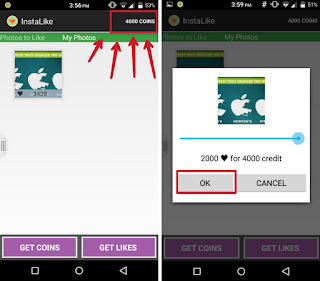
*Afte you have succesfully logged in using INSTALIKE , you will see a get Like button on the bottom right corner of the app (refer screenshots).

*Press Get Likes.On the top you will see your credits which you can use to get likes on any picture you choose below.

*But the problem is that you would have only 30/60 credits/coins.So the solution, CHEATDROID.

*Open CHEATDROID.

*Scroll and find INSTALIKE in the app list.Click on INSTALIKE.

*Scroll and and find UserPoints.xml

*Click on it and edit the the number given to a desired value (not more that 10000)

*Next, close all apps and open

*INSTALIKE again.Now you will see that you will have that number of credits that you edited in UserPoints.xml

*Now choose from any pictures below and press get likes.Choose how many like you want (again not more than 10000) and done.

*Now wait a few hours so the apps gets it unique Likes for your photo.

*If your coins on instalikes gets over then enjoy on more photos by repeating steps 11 to 18.


NOTE:-Do not try to get more than 10000 likes at one go as this could result in you id being permenantly banned from instagram.

NOTE:-If you get a login error in instalikes app ,change your instagram password and try again.

To download- instalikes latest 

To download- cheatdroid pro 


HOW TO GET YOUR FRIEND'S IP ADDRESS OR HOW TO KNOW HWO CREATED FAKE ID ON FACEBOOK??

Hii Friendz

Today's

I was coming with a new amzing trick
with the help of this trick
you can easly know your friend's ip
simply using below steps::

Step 1:- First open your Facebook  account

Step 2:- Now invite your friend in facebook chat box and close or other's tab.

step 3:- Now click start and open run.

Step 4:- Now simply type here `netstat -a` and open..

Step 5:- Now after getting address  go here or  here (to know who created fake id on facebook)

Step 6:- Now paste your friend's ip and get fully information.

ENJOY!!!!!!!


NOTE:-NEVER PROVIDE YOUR IP ADDRESS OPENLY OR YOU WILL LED YOURSELF INTO DANGER AS HACKERS REQUIRES IP ADDRESS TO HACK YOUR DEVICE.

NOTE:-THIS IS FOR EDUCATIONAL PURPOSE ONLY.DON'T TRY TO HARM ANYONE.

Also read- hide your ip address 

Also read- channge your ip address 


WATCH 18+ VIDEOS IN YOUTUBE WITHOUT RESTRICTIONS

Often have you come across a video on YouTube that had asked you to login just because contain either nudity, explicit language or violence, are
put under the 18+ category and you cannot watch these videos. For this i have come up with a tutorial which will guide you to bypass this restriction and watch that video.

First goto any 18+ video like below link;

http://www.youtube.com/watch?v=LqWIvFeEhiI

When you will open this link it will change in to this;

http://www.youtube.com/verify_age?next_url= /
watch%3Fv%3D LqWIvFeEhiI

Now you have to edit this link to make this video viewable, remove all the highlighted words from the link

http://www.youtube.com/verify_age?next_url=/
watch%3Fv%3DLqWIvFeEhiI

After removing all the highlighted words your link will be look likes;

http://www.youtube.com//LqWIvFeEhiI

Now add the highlighted words in your link;

http://www.youtube.com/ v /LqWIvFeEhiI ?fs=1

After adding the highlighting words your link will be looks like this;

http://www.youtube.com/v/LqWIvFeEhiI?fs=1

Now you can this video without age restriction. Also you can view any 18+ video by just doing the
above things.

NOTE:-THIS TUTORIAL IS FOR EDUCATIONAL PURPOSE ONLY. DON'T TRY TO HARM ANYONE.


[EXCLUSIVE]FACEBOOK DAILER APK DOWNLOAD

Make your phone smarter with Hello. Built by Messenger just for Android, Hello combines info from Facebook with the contact info on your phone so it's easy to stay in touch with the people you care about.

Now you can see who's calling, block unwanted calls and search for people and places on Facebook. You can also call and text people for free using Messenger.

• See who's calling you, even if you don't have that phone number saved in your phone.

• Easily block unwanted calls.

• Automatically block calls from numbers that have been blocked by a lot of other people.

• Search your phone contacts and people and places on Facebook, without switching between apps.

• Always have the latest info about your contacts, including their profile pictures and birthdays.

• Open a Facebook profile or Page with just one tap.

• Call and text for free with Messenger.

• Call, add and edit contacts — just like you do on your phone.

Download Hello and make it your dialer.


REQUIREMENTS:-
*Android device
*Android version(4.0.+)
*Facebook App(Not Facebook Lite)


NOTE:-THIS APP IS NOT AVILABLE ON INDIAN PLAYSTORE.BUT YOU CAN MAKE IT AVILABLE USING VPN. 


To download- click here (Playstore link)
To download- click here (Direct link)


HOW TO TRACK YOUR FACEBOOK LOCATION


Security on social media is very essential. The user profiles have so much of personal data, which are often vulnerable. Hackers are always active, one loop hole in your account, and it gone forever!

So here, i am talking to you about the safety measure you should comply with as you use your Facebook. This post in particular is about keeping an eye on the locations from where your Facebook has been logged in. Yes, you heard it right.

This post is going to be a guide for you as to how can you track your Facebook login location!

With the help of this newly added feature, Facebook lets you be fully aware of the happenings on your account. When you find anything suspicious, you can go ahead with further security steps, to help yourself from being in any kind of mess.

So, lets begin with the steps you have to follow to keep your login locations tracked! This is an official feature by Facebook, and there’s no need for may other application for the procedure:-

*With the log in, click on the arrow that points down.

*From the drop menu bar on your upper right corner, go to settings.

*Next visit the security settings from the menu on your left, followed by an option to edit, which is right in front of the Where You’re Logged in option.

*From here, you can view all the locations that have been mention to login into your account.

After the entire read, if you find anything that seems to be fishy, you can definitely ensure that nothing like that happens again. This one step, can be the very basis of finding out if your Account is being mal handled by someone else.

Security steps ensure a better user experience. You dont have to be worried about someone trespassing into your account, specially with an ulterior motive.

If u have that locations are not right as per you then change your account password.

Be attentive, and be safe!


MAKE YOUR FACEBOOK PROFILE PHOTO UN-CLICKABLE

HERE IS THE TRICK:-

*Login in your facebook account

*click on "Photos" tab

*Go to your Albums > Profile Pictures

*Select your current profile picture.
Adjust privacy setting to “Only Me


CONVERT YOUR FACEBOOK PROFILE INTO FACEBOOK FAN PAGE

Before converting your profile into a fan page; you must read facebook tearms and condition  from here .

When you are ready to change your personal account into fan page:-

1: Go to  profile to page migration 

2: Click to choose a category of your page

3: Select a specific category from the dropdown menu and fill out the required information

4: Click Get Started and follow the on-screen instruction.


Note:-You can get your profile back so first think and you will loose your groups,pics,videos shifted to your page and your friends will likes of your fanpage.


BYPASS PHOTO VERIFICATION TRICK FOR FACEBOOK

Facebook is a social networking platform which connects you to your friends but sometimes its tell us to complete a photo verification. So today i am going to share this trick with you to complete photo verification easily. So Follow below given steps.


Steps for  Bypass Photo Verification Trick ForFacebook :-

*First go  here 


*Open www.fb.com

*Now Facebook Mobile Version will open.

*Login with Blocked Account.


*Now it will ask you for DOB or Mobile Number Verification.

*Verify anyone Your Account will be open.

*Tested 100% Working

ENJOY!!


POST AUDIO COMMENTS/VOICE MESSAGES ON FACEBOOK IN PC USING CHROME BROWSER

How do you prefer to interact with your friends on Facebook? you poke them, post on their walls or comment on their posts. When major social networks apps such as Whatsapp and Wechat are already offering audio messaging as a standard feature, why is Facebook lagging behind?

Although the Facebook messenger app for android and iOS has a feature to send voice messages to your friends, but on the web, messaging is still limited to monotonous texts and smileys.

For those who have been eagerly waiting for an audio commenting feature on Facebook, you don’t have to wait anymore till Facebook launches it officially. If you are a Google chrome user, you can skip the wait and use the Talk and Comment extension to add audio commenting and voice messaging features to Facebook on the web.


Once you install the Talk and Comment extension in Google Chrome, you can then comment on you friends posts using audio comments and send voice messages through the Facebook messenger. The instructions below will guide you through the process of installing and using the Talk and comment extension on Google chrome.


Now follow the steps here:-

Step 1: Install the Talk and Comment extension on Google chrome from the link provided at the bottom of this article. When installed, the extension will ask you permission to access your microphone. Click on Allow to grant it access to your microphone.


Step 2: You will then be able to see a mic icon in the comment fields below all posts in Facebook.


Step 3: Click and hold the mic button and speak anything to record an audio comment. When you release the button the audio comment will be converted into a URL.


Step 4: Press enter and the URL will be automatically converted into an audio comment. The same even goes for Audio messages.


As usual the audio comment will only appear as a playable link to the receiver if only he / she is using Google chrome with the Talk and Comment extension installed. Otherwise what they would receive is a link to the Audio comment which once clicked will be opened in a new tab with a playable button. This should not be a problem since you can tell your friends to install the extension beforehand.

Believe me, if you are not using audio comments on Facebook, you are really missing on a lot of fun. Leave behind the age old tradition of chatting with monotonous text and smileys. Audio comments and voice messages are a more fun way of interacting with your friends on Facebook. Go ahead and install the Talk and Comment extension Google chrome and speak it out on Facebook using audio comments and voice messages


To download extention- click here